
Skip to content

30 days of Solo free for sign-ups until 31 December 2026. No card needed.

Start 30-day Solo free

stock, orders and bookings Operations

Products, suppliers, orders, bookings.

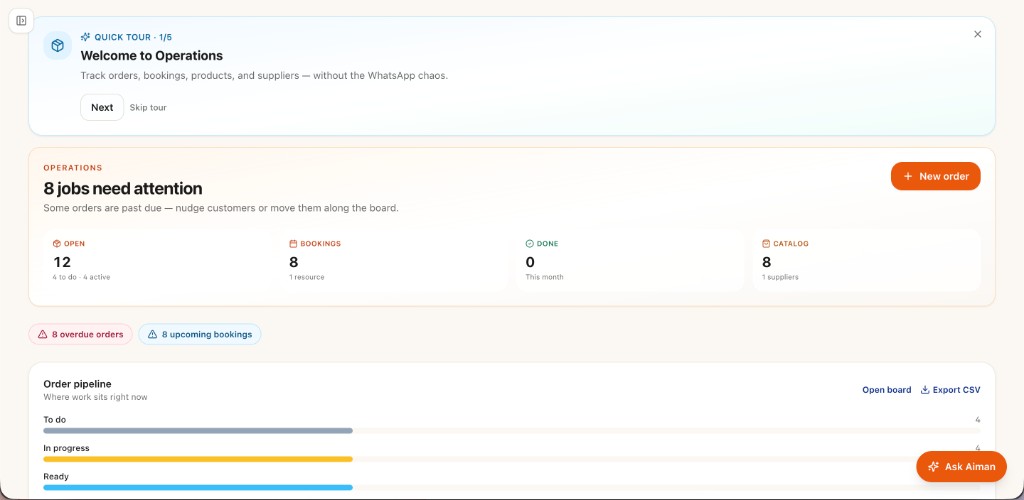
The NiagaX Operations module holds a catalogue with SKU, price, and image. Supplier list. Order pipeline from New to Delivered. Booking calendar. Low-stock flags.

Catalogue, suppliers, orders, bookings. · Unlocks: Solo and above · AI agent staff: Aiman

Operations · Orders

NiagaX Operations orders, bookings, and Ask Aiman screen

How Operations works

  1. 01

    One catalogue

    SKU, price, image. Not a second Excel only the owner can open.

  2. 02

    Orders have a pipeline

    New → Delivered. Suppliers sit next to the SKU.

  3. 03

    Bookings on a calendar

    Low-stock flags when the count is real.

Who Operations is for

  • Businesses that sell physical goods or take bookings.
  • Owners who still track stock in a notebook.
  • Teams on Solo+ that need Aiman on the day plan.

What Operations is not

  • Not a warehouse WMS.
  • Not a multi-warehouse chain system.
  • Not on Free or Basic.

How owners use Operations

A kedai runcit

Every product goes into the catalogue with a SKU, price and image, and suppliers sit next to the items they supply. When a count runs low, the low-stock flag shows what to reorder before the shelf is empty. Aiman can answer what is low this week from the same catalogue.

An online seller packing orders

Orders move from New to Delivered on the pipeline, so the owner can see what still needs packing each morning. Aiman can answer which orders have not moved, from the records rather than a chat scroll. Suppliers sit next to each SKU, so reordering a fast seller starts from the record.

A salon taking appointments

Appointments sit on the booking calendar, and Aiman surfaces today's bookings. A salon that wants customers to pick their own slot can add the customer booking page, a RM9 a month add-on. Products used on clients can sit in the catalogue too, with low-stock flags when the count is updated.

On Free and Basic

  • Operations is not included. Start with invoices, then upgrade.

On Solo+

  • Full catalogue, orders, bookings, and Aiman.

What's in

  • Product catalogue
  • Suppliers and order pipeline
  • Booking calendar
  • Basic stock + low-stock alerts

AI agent staff: Aiman →

Free vs paid in Operations

Free vs paid in Operations
FeatureFree and BasicSolo and above
Operations moduleNot includedIncluded from Solo (RM79 a month)
Product catalogue with SKU, price and imageNot includedIncluded
Supplier listNot includedIncluded
Order pipeline, New to DeliveredNot includedIncluded
Booking calendarNot includedIncluded. Customer booking page is a RM9 a month add-on
Low-stock alertsNot includedIncluded
Aiman, AI agent staffNot includedIncluded, using monthly credits: 120 on Solo, 180 on Micro, 360 on Small

Operations questions

Is Operations on Free or Basic?

No. Operations is not on Free or Basic. It unlocks on Solo (RM79 a month), which opens all six modules, and is included on Micro and Small. Solo has a 30-day trial.

What does Aiman do in Operations?

Aiman works from your catalogue, orders and booking calendar. He flags low stock, helps move orders along the pipeline, surfaces today's bookings and answers questions like what still needs packing. Each ask uses credits. At zero credits he pauses, and orders stay on the board.

Can my staff update stock and orders?

Solo includes one seat. Micro includes five seats for the counter and back office, and Small includes twelve. Extra staff seats are an add-on at RM9 per seat per month.

Is this a warehouse system?

No. Operations is a catalogue, supplier list, order pipeline and booking calendar for a small business. It is not a warehouse management system and does not handle multiple warehouses.

Can customers book online?

With the customer booking page add-on (RM9 a month), customers pick a slot and Aiman shows today's bookings on the calendar. Without it, you add bookings to the calendar yourself.

en